
How Aceloop Works
Kernel-mode driver. Memory read. Four stealth layers. Hasn't been caught on CoderPad Enterprise, where InterviewCoder has. The architecture in one read.
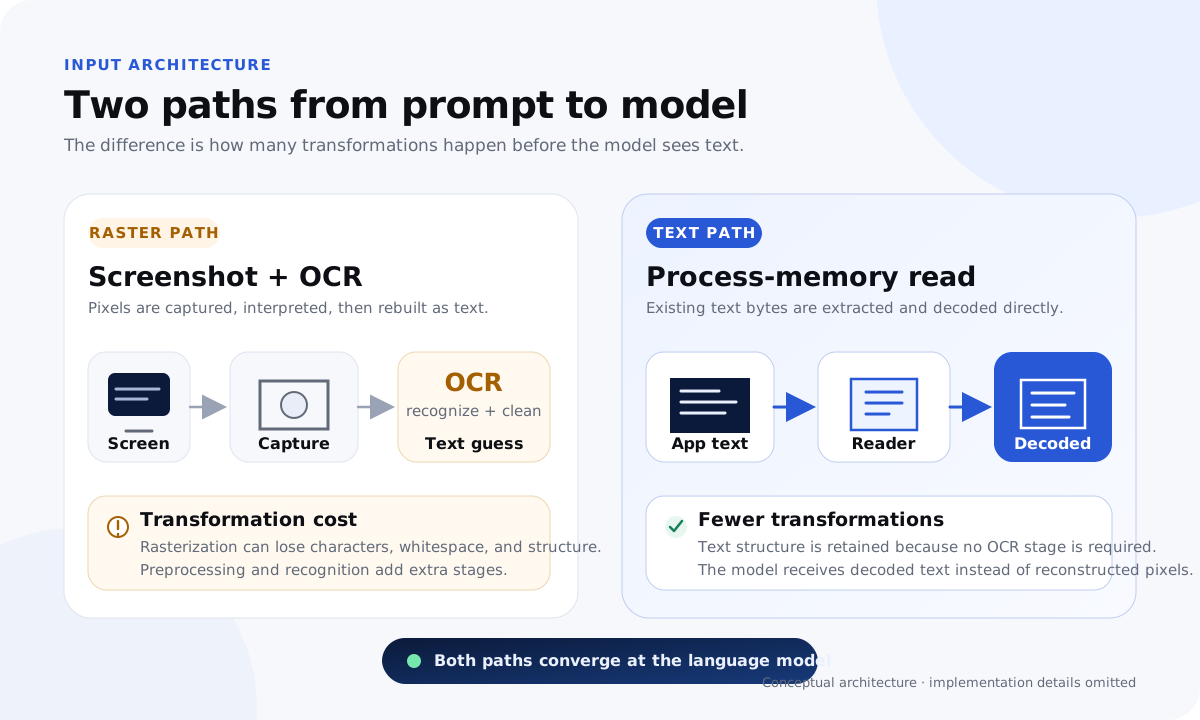
What every screenshot-OCR tool does
Snap a screenshot. Upload it to a service. Wait for OCR. Paste the answer back into the editor. Each step adds detection surface: a Win32 capture-API trace, a screen-capture pipeline visible to fingerprinting, OCR latency a senior interviewer will notice, and a clipboard write that lands as a paste event in the platform's content script.
Tools that ship at this depth fail on Enterprise-tier proctoring. CoderPad Enterprise's content script reads paste events and DOM mutations; HackerRank tracks tab-switch and focus-blur deltas; CodeSignal IQ runs keystroke biometrics on pasted code. The screenshot-OCR pipeline is the wrong shape.
We don't snap. We read.
Process memory holds the bytes. The browser's V8 isolate has the problem statement parsed into SeqOneByteString objects on the heap. The IDE's text buffer holds your code. The terminal pane holds the test output.
No screenshot. No OCR. No clipboard. The kernel driver attaches, reads pages, and the bytes go straight to the model. Single-digit-millisecond read latency. Bytes verbatim: no font-fallback errors, no anti-aliasing collapse on lookalike characters, no scrolled-region truncation.
Below the user-mode boundary, in four directions
Most AI interview tools ship one stealth feature: a single user-mode capture flag. That flag is queryable in one syscall, which means the proctor sees the flag itself as a fingerprint. We layer past it.
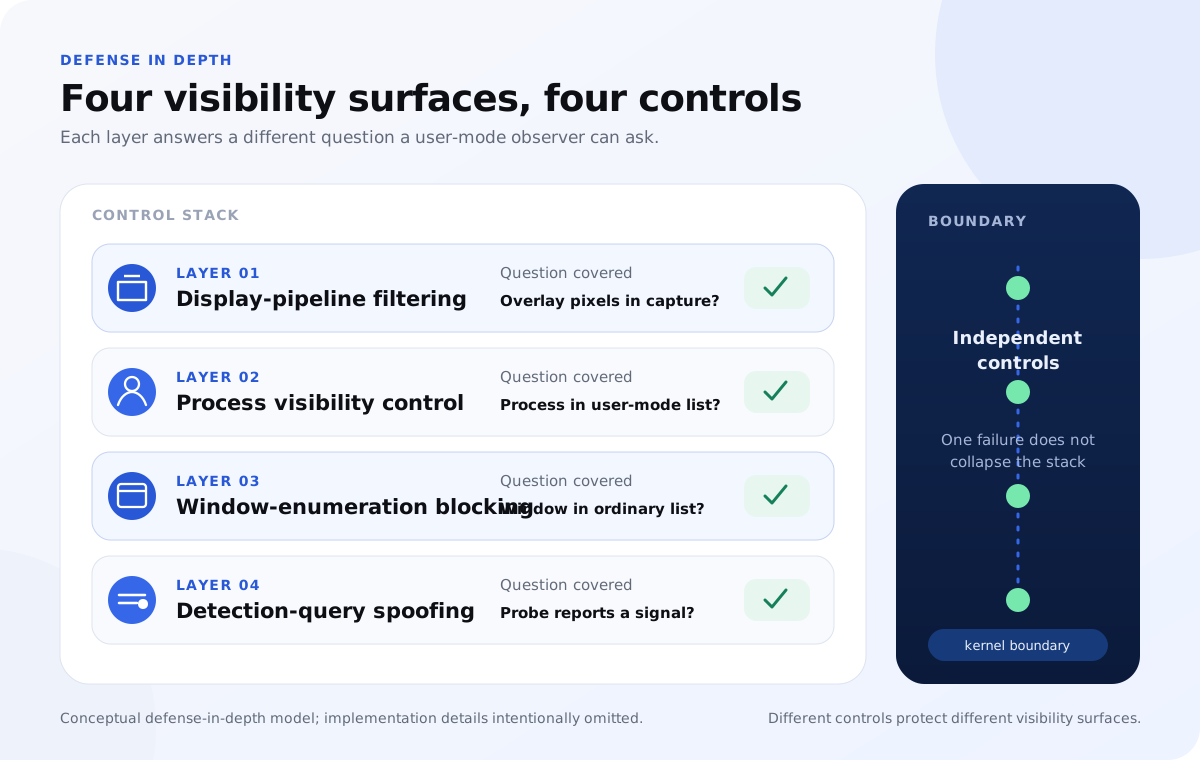
Display-pipeline filtering
The overlay is stripped from the Windows display pipeline before any capture path (DXGI duplication or GDI BitBlt) can see it.
Process concealment
No entry in the task list a proctor scan can read. The process is hidden from user-mode enumeration.
Window-enumeration blocking
Scanners that walk the OS window table, including Fair Screen's click-through sweep, never see a window to flag.
Detection-query spoofing
The queries proctor stacks run to find overlay tooling get answers indistinguishable from a clean machine.
Three keystrokes, three data paths
Each hotkey reads from process memory at the kernel each press. So when you ask the model "why this and not BFS?" after the initial Solve, it answers against your actual current code, not a regenerated-from-scratch version.
| Hotkey | Action | What it reads |
|---|---|---|
| Alt + Enter | Solve | Reads the problem statement fresh from process memory; streams hints, approach, code, and complexity. |
| Alt + D | Debug | Re-reads your current code and the failing output; names the root cause and produces the corrected code. |
| Alt + O | Optimize | Re-reads once more; walks the better strategy and updates the time and space complexity. |
Kernel-mode is the safer bet
"Install a kernel driver" sounds like the higher-risk option. Architecturally it's the opposite. A signed kernel driver goes through Microsoft's WHQL attestation pipeline, ships under our EV cert, and has an immutable hash on every release. A user-mode tool can be silently hot-patched at any time; a kernel-signed binary cannot.
The deeper reason kernel-mode wins on safety: detection runs at ring-0 for every commercial anti-cheat because that's where the ground truth is. A user-mode AI overlay is detectable by a kernel-mode anti-cheat module; a kernel-mode AI overlay is not, because proctoring stacks don't ship signed kernel drivers to candidate machines.
What we never do
Every claim below is verifiable from the candidate's side via the proctor test page. If our binary triggered any of these surfaces, the test page would log it.
- No keystroke events leak into the browser tab. Hotkeys are consumed at the kernel hook.
- No paste events, no clipboard writes, no DOM injection into the platform page.
- No entry in the window table or the process list a proctor scan reads.
- No focus steal: the interview tab stays the foreground window the entire round.
Same architecture on all four interview platforms
HackerRank, CodeSignal, CoderPad, and LeetCode all have different anti-cheat stacks. The detection-side details vary; the input-side does not. Every one of them renders its problem text into a Chromium DOM in a renderer process. Our kernel driver reads process memory regardless of which web app rendered the bytes.
Get the offer.
A blown FAANG round costs the offer. A FAANG signing bonus covers a year of Plus by 70×. Verify it yourself before you buy: the proctor simulator runs the same detection vectors a real proctor uses.
Aceloop is an independent product. Architecture details reflect Windows-internals public docs and current proctoring-stack behavior as of May 2026.