
The most secure AI interview copilot currently on the market.
That claim isn't based on branding. It's based on the architecture: Aceloop is Windows-native, kernel-based, and built around process-memory context instead of screenshots, OCR, clipboard scraping, or a browser extension. Every competing product we track ships a shallower user-mode, browser, or screenshot-first model.
No screenshot input
Core context comes from text already present in the coding surface, not broad pixel capture plus OCR.
Ring 0 Windows depth
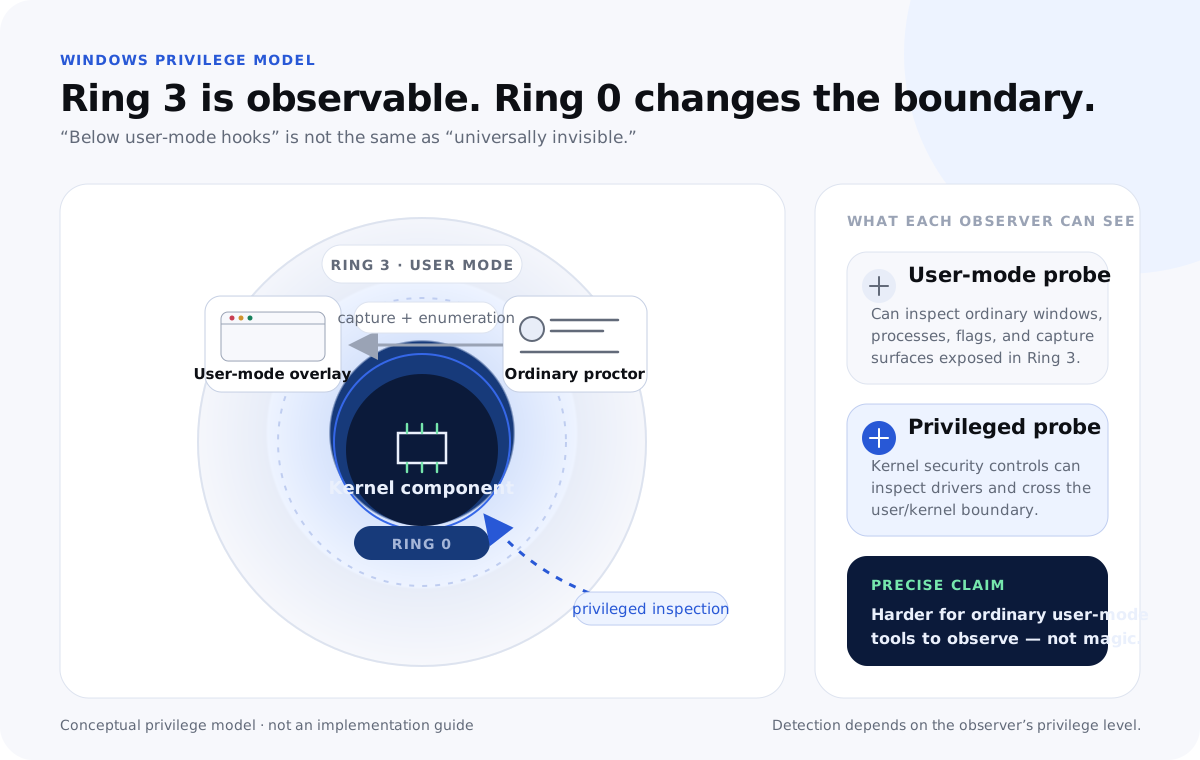
Aceloop goes below ordinary user-mode overlays and browser extensions, where the important Windows security boundary lives.
Small data footprint
Problem text, code, terminal output, and model answers are not stored as Aceloop session records.
Signed release path
A kernel-based product has to earn trust at install time, so release signing and binary verification are part of the pitch.
Security is the product feature. Everything else is secondary.
Aceloop has inline autosuggestion, Debug, Optimize, Go deeper, live voice, system-design mode, architecture graphs, and a full Windows overlay workflow. Those features matter. They aren't the reason the product exists. The number-one feature is security. The vast majority of engineering effort goes into the Windows-native security model: Ring 0 depth, raw process-memory context, display-pipeline behavior, release signing, and a workflow that avoids screenshots, OCR, clipboard scraping, and browser-extension dependency. The assistant features are built on top of that foundation, not the other way around.
Why "most secure" is a fair claim
In this category, security is mostly architecture. Screenshot-first tools ask the operating system for pixels, OCR the screen, and hope the result is clean enough. Browser tools live where browser instrumentation can see them. User-mode overlays depend on flags and window behavior that are easy to query once a platform knows what to look for. Aceloop is different because the core product is built around a Ring 0 Windows stack. The assistant reads the problem, code, and output from process memory, avoids screenshot/OCR input for core context, and keeps Aceloop's own storage surface intentionally small.
If another product wants to beat that security claim, it has to match the kernel-based architecture first. A product that starts with screenshots, a browser extension, or a generic cross-platform overlay is not playing the same security game.
Why Ring 0 exists in the model
Ring 0 is the privileged Windows kernel layer. Running part of the system there is not a decorative phrase: it's the reason Aceloop can make a stronger security claim than screenshot, browser-extension, and ordinary overlay tools. The architecture puts the product below the surfaces most competitors rely on. That extra depth creates a higher trust bar, so the release story matters: signed driver releases, notarized macOS releases, explicit data flow, minimal retention, and narrow platform commitments. The claim is aggressive because the architecture is aggressive.
Read-only context extraction, not screen scraping
Aceloop's core advantage is that the assistant can work from raw text already present in the browser and coding-platform process memory. The browser already holds the problem statement, the current code, and the run output in RAM. Aceloop reads that low-level context directly instead of re-photographing the screen and guessing what the pixels mean.
The model is read-only by design. Aceloop does not need to mutate the browser, inject a content script, copy from the clipboard, or scrape a screenshot. Screenshots are broad: they can include browser tabs, notifications, chat windows, names, calendar alerts, or unrelated private material. OCR also adds latency and mistakes. A raw memory text-context path is narrower, faster, and cleaner.
Why platform-specific depth is part of the security model
Deep security work is operating-system-specific. A Windows kernel driver, Windows display behavior, Windows signing, and Windows endpoint constraints do not translate cleanly to macOS or Linux. macOS has its own ScreenCaptureKit, TCC, signing, notarization, and permission model. Aceloop supports Windows and universal macOS because those are the stacks we can reason about directly. Windows remains the deepest protection layer because the kernel/display architecture permits it; macOS support follows Apple's permission and notarization model instead of pretending the Windows driver design ports unchanged.
This is why a cross-platform competitor cannot make the same security claim by default. If a tool sells itself as "works everywhere," it is almost certainly giving up the OS-specific depth that makes Aceloop secure.
The model is half the guarantee. The room is the other half.
Aceloop gives you the lowest-level, most secure product architecture in the category. The best practices make sure your physical setup and workflow don't throw that advantage away.